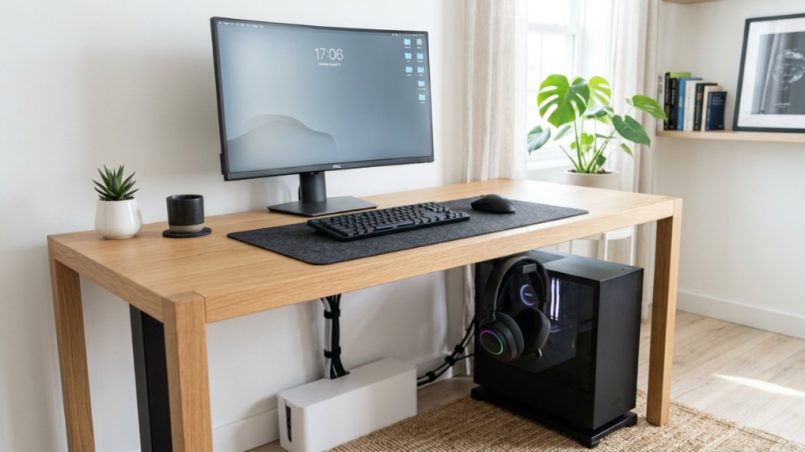
Your desk is a battlefield. Between your monitor, keyboard, coffee mug, notepad, phone charger, and that pile of sticky notes you swear you’ll sort later, there is simply no room for a bulky headset. Tossing your headphones on the desk is a temporary fix that leads to scratched ear cups, tangled cables, and lost desk real estate. The solution is hiding in plain sight: the vertical plane beneath your work surface. By using under desk headset hangers, you can reclaim precious square inches, reduce clutter, and extend the life of your equipment without spending a fortune or drilling into drywall. Let’s explore how these simple tools transform your workflow and your desk.
What Exactly Is an Under Desk Headset Hanger?
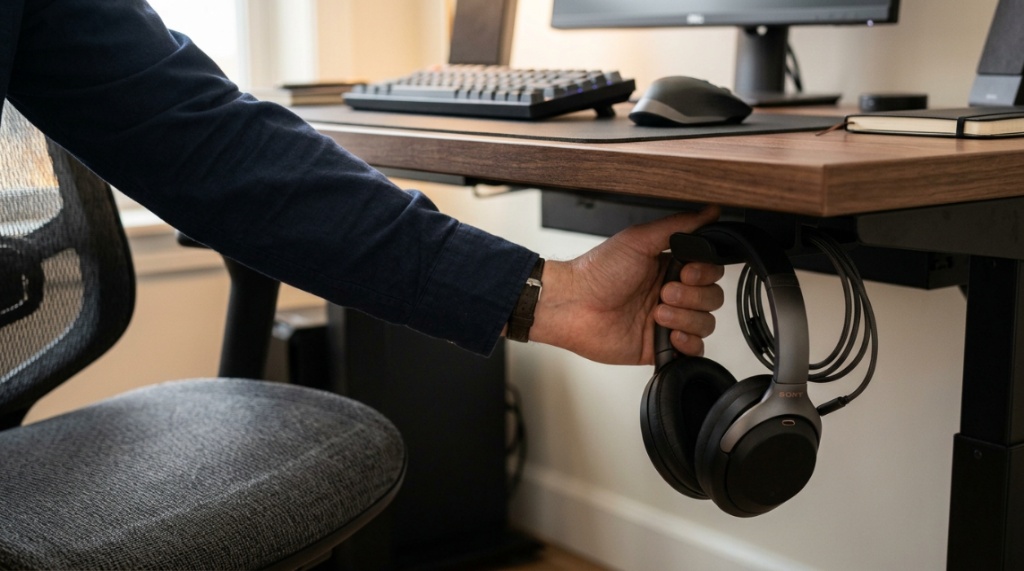
An under desk headset hanger is a mounting accessory that attaches to the underside of your desk, allowing you to store your headphones out of sight and off your work surface. It typically uses adhesive, a clamp, or a screw mechanism to secure itself to the desk’s bottom edge or underside.
Common Design Types
Most hangers fall into one of three categories. Adhesive hangers use industrial-strength tape and are ideal for renters or temporary setups. Clamp-on hangers grip the edge of the desk and require no permanent modification. Screw-in hangers offer the most secure hold but leave small holes behind.
Materials and Durability
You will find hangers made from aluminum, steel, silicone, and hard plastic. Metal options provide superior longevity for heavier pro headsets, while silicone variants protect delicate padding and prevent scratches. Look for rubberized coatings or padded contact points to avoid damaging your desk’s finish.
Why It Saves More Space Than a Desk Stand
Desk-top stands occupy about six to eight inches of horizontal space. Hanging your headset underneath frees that entire footprint for your mouse pad, documents, or a second monitor. This is especially valuable for small desks, standing desks with limited tops, or shared workspaces where every inch matters.
Why Should You Mount a Headset Hanger Under Your Desk?
Mounting your headset underneath your desk directly addresses three common frustrations: clutter, equipment damage, and ergonomic inefficiency. It keeps your headphones accessible but completely out of the way.
Protects Your Investment
High-quality headphones can cost several hundred dollars. Leaving them loose on a desk invites accidental knocks, spills, and pet accidents. An under-desk mount secures them safely away from these hazards while maintaining constant airflow to prevent moisture buildup inside ear cushions.
Reduces Visual Clutter
A clear desk reduces cognitive load. Studies suggest that physical clutter competes for your attention, even when you aren’t actively looking at it. By relocating your headset below eye level, you instantly make your workspace feel more organized and less chaotic.
Improves Cable Management
Many under-desk hangers include cable routing hooks or channels. This helps keep your headphone cable neatly coiled and out of your mouse’s path. You eliminate the frustration of pulling a tangled cord every time you stand up or reach for a drink.
How Do You Choose the Best Mounting Method?
The best mounting method depends on your desk material, your willingness to modify furniture, and how heavy your headset is. Each attachment style has clear trade-offs.
Adhesive Mounts: Best for Lightweight Headsets and Renters
Adhesive hangers use 3M VHB tape or similar high-bond materials. They work wonderfully on wood, metal, and smooth plastic surfaces. Avoid using them on textured, painted, or laminate desks where the bond may weaken over time. They support most gaming and office headsets under one pound.
Clamp-On Mounts: Best for Versatility and Strength
Clamp-style hangers attach to the edge of your desk without adhesive. They are fully adjustable and easy to remove. The main downside is that they require at least half an inch of desk edge thickness. They also protrude slightly forward, which may interfere with your thighs or chair armrests.
Screw-In Mounts: Best for Permanent Workstations
If you have a dedicated desk that you won’t move often, screw-in mounts offer the strongest hold. They can support professional broadcast headphones weighing several pounds. The trade-off is visible screw holes if you later remove the mount,If you enjoy customizing your workspace with practical DIY builds—such as using a leather-crafting guide to calculate leather sheets for bookshelf project setups—adding a custom or minimalist headset holder is another great way to optimize your desk.
Which Headsets Work Best with Under Desk Hangers?
Almost any headset can be stored under a desk, but certain design features make the experience much better. Pay attention to headband width, weight distribution, and cable orientation.
Headsets with Wide or Padded Headbands
Hangers typically grip the headband rather than the ear cups. A wide, padded headband distributes weight evenly and prevents bending or deformity. Thin plastic headbands may develop stress cracks over time if hung continuously.
Wireless vs. Wired Considerations
Wireless headsets are ideal because you only need to store the headset itself. Wired headsets require careful cable management to prevent the cord from dangling into your lap or snagging on your chair wheels. Look for hangers with dedicated cable clips to solve this.
Heavy Professional Headsets
Broadcast headsets and high-end gaming headsets with metal frames need a hanger with a weight rating of at least two pounds. Screw-in or heavy-duty clamp mounts are recommended for these models.
How Do You Install an Under Desk Headset Hanger Properly?
Proper installation ensures your hanger stays put and your headset remains secure. The process differs slightly by mounting type, but the core steps are straightforward.
Step 1: Choose the Right Location
Sit at your desk and reach underneath. You want the hanger positioned so your headset is easy to grab but does not hit your knees or chair armrests. A spot near the front edge, centered or slightly to the dominant hand side, works best for most people.
Step 2: Clean the Surface Thoroughly
For adhesive mounts, clean the underside of your desk with isopropyl alcohol and a lint-free cloth. Remove all dust, grease, and residue. Let it dry completely before applying the adhesive pad. A greasy surface will cause the mount to fail within days.
Step 3: Apply Firm Pressure for the Recommended Time
Adhesive mounts require sustained pressure for 30 to 60 seconds after application. Many manufacturers recommend waiting 24 hours before hanging your headset to allow the bond to cure fully. Clamp mounts simply tighten until snug, but be careful not to overtighten and crack the desk edge.
Step 4: Test the Load Gradually
Start with an empty hanger for a day to confirm adhesion. Then hang a light headset before transitioning to your primary pair. This step prevents sudden failure that could drop your expensive headphones onto the floor.
Can Under Desk Hangers Damage Your Headset?
When chosen and installed correctly, under desk hangers are completely safe for your headset. However, poor choices can lead to damage over time.
Potential Risks to Consider
Low-quality hangers with sharp edges or exposed metal can scratch headband padding. Hangers with hooks that are too small can compress foam ear cups. Also, hanging a headset by the band rather than the cups applies constant tension, which may eventually loosen the band’s clamping force on some models.
How to Avoid Damage
Select hangers with smooth, rounded edges and rubber or silicone coating. Ensure the hook width matches your headband’s thickness. For premium headsets, position the headset so the ear cups rest on the desk surface rather than dangling free. This reduces long-term stress on the headband.
When to Avoid Under Desk Storage
If you own a headset with a fragile plastic hinge on the headband or an unusually heavy ear cup design, consider using a wall-mounted hook instead. The vertical orientation of a wall mount distributes weight differently and may be safer for these specific designs.
What Features Should You Look for When Buying an Under Desk Hanger?
Not all hangers are created equal. A few key features separate a great purchase from a frustrating one. Prioritize these criteria during your search for under desk headset hangers.
Build Quality and Materials
Look for aluminum or steel construction with a powder-coated finish. Plastic hangers can crack in cold environments or under heavy loads. Rubberized contact points protect both your headset and your desk surface from scratches,If you enjoy customizing your workspace with practical DIY builds—such as using a leather-crafting guide to calculate leather sheets for bookshelf project setups—adding a custom or minimalist headset holder is another great way to optimize your desk.
Weight Capacity
Check the weight rating. Most lightweight hangers support up to 1.5 pounds, while heavy-duty models handle 3 to 5 pounds. Weigh your headset on a kitchen scale before buying to ensure compatibility.
Adjustability and Reach
Some hangers feature an articulating arm that allows you to position the headset exactly where you want it. This is particularly useful for standing desks where the underside clearance changes throughout the day.
Ease of Removal
If you move desks frequently or rearrange your workspace, choose a clamp or adhesive mount that can be removed without damaging the desk. Avoid permanent screw-in mounts unless you own your desk.
How Does an under-desk hanger compare to other storage solutions?
Several headset storage options exist, each with unique pros and cons. An under-desk hanger offers the best balance of space-saving and accessibility for most users.
Under Desk Hanger vs. Desk Stand
Desk stands occupy valuable surface area but offer easy access. Under-desk hangers free that space but require you to reach below to retrieve your headset. For users with deep desks, the reaching motion is trivial. For shallow desks, the under-desk option is superior.
Under Desk Hanger vs. Wall Mount
Wall mounts are excellent if your desk is against a wall and you have convenient wall space. They keep the headset at eye level. However, they require drilling into walls and are difficult to reposition. Under-desk hangers are far more flexible for renters and frequent movers.
Under Desk Hanger vs. Drawer Storage
Storing a headset in a desk drawer protects it from dust and sunlight but makes it inconvenient to grab during calls. It also takes up drawer space meant for supplies. Under-desk storage offers better daily usability without sacrificing drawer capacity.
How Do You Maintain an Under-Desk Headset Hanger?
Maintenance is minimal, but a few simple habits will extend the life of both the hanger and your headset.
Periodic Tightening and Inspection
If you use a clamp or screw mount, check the hardware every few months. Vibrations from typing or standing desk movements can loosen screws over time. Tighten them with a screwdriver if needed.
Cleaning the Adhesive Area
Dust accumulates under desks. Wipe the mounting area with a dry microfiber cloth every month. If the adhesive loses tackiness, replace the pad with a new one from the manufacturer or use a heavy-duty double-sided tape.
Preventing Dust Build-Up on the Headset
Though under-desk storage protects from spills, it does not protect from airborne dust. Give your headset a quick wipe with a dry cloth weekly. Consider using a dust cover if you work in a particularly dusty environment.
Frequently Asked Questions
Will an under desk headset hanger work on a standing desk?
Yes, but you must account for the extra clearance needed when the desk is at its lowest position. Mount the hanger toward the front edge so your knees do not hit it while seated. Many hangers work perfectly with standing desks.
Can I use an under desk hanger with a thick desk edge?
Clamp mounts typically fit desks up to 2 inches thick. Adhesive mounts work on any thickness since they attach to the flat underside surface. Always check the product specifications for maximum thickness compatibility.
Do under desk hangers work with gaming headsets?
Absolutely. Most gaming headsets are lightweight and have wide headbands, making them ideal for under-desk storage. Just ensure the hanger’s hook is wide enough to accommodate RGB cables or bulky ear cups.
Is it safe to hang a headset by the headband?
Yes, for the vast majority of headsets. The headband is designed to withstand pressure from stretching over your head. Hanging it adds far less stress than normal use. Avoid hanging headsets with exposed wires running through the headband.
How do I remove an adhesive under desk hanger without damaging my desk?
Use a hairdryer on low heat to warm the adhesive for 30 seconds. Gently pry the hanger loose with a plastic spudger or credit card. Rub away any remaining adhesive with a bit of rubbing alcohol. Avoid using metal tools that could scratch the desk surface.
Can I mount a headset hanger on a glass desk?
Adhesive mounts can work on glass, but the bond is less reliable than on wood or metal. Use a suction-cup style mount designed specifically for glass surfaces. Never use clamp mounts on glass desks as they can create stress fractures.
What is the ideal position for an under desk hanger?
The ideal position is directly in front of your dominant hand, about 4 to 6 inches from the front edge of the desk. This allows you to grab the headset without leaning forward while keeping it out of your lap and chair range.
Conclusion
Reclaiming your desk space does not require a complete office overhaul. An under desk headset hanger solves the clutter problem, protects your equipment, and improves your workflow with a single, low-cost installation. By understanding mounting options, headset compatibility, and proper installation techniques, you can find a solution that works for your specific desk and daily habits. Whether you choose an adhesive, clamp, or screw-in model, the key is matching the hanger’s strength and design to your headset’s weight and your desk’s material. Stop fighting for space on top of your desk and start using the space beneath it. Your back, your headphones, and your productivity will thank you.